# React Performance Lab: Interactive Demos of React Performance Patterns
I built [React Performance Lab](https://react.jainabhinandan.com) to make React performance concepts tangible. Instead of just reading about
React.memo, useMemo, or useCallback, you can see side-by-side bad vs good implementations and watch render counts in real time. Here’s what the lab covers and why it’s useful.## Why a Performance Lab?
Many React performance articles stop at “use React.memo here.” They don’t show when re-renders happen or how much unnecessary work you’re doing. The lab gives you:
- Live render counters so you see exactly when parent and child re-render
- Bad vs good code and UI side by side
- Interactive demos (inputs, buttons, lists) so you feel the lag or smoothness yourself
- Console logs so you can open DevTools and correlate behavior with code
Open [react.jainabhinandan.com](https://react.jainabhinandan.com) and your browser’s console to get the full picture.
## Concept 1: Unnecessary Re-renders
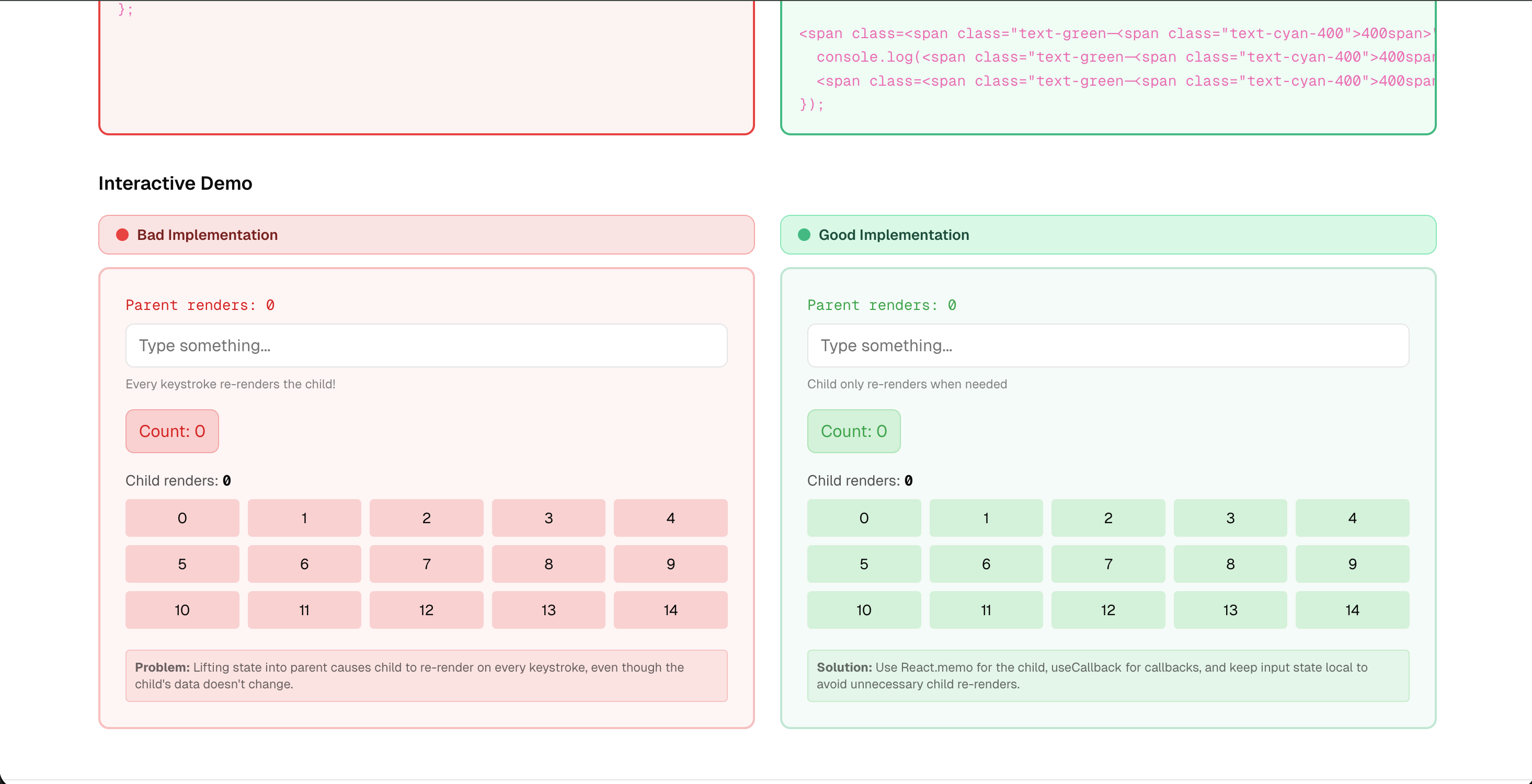
Problem: Lifting state into the parent causes every child to re-render on every keystroke or click, even when the child’s props haven’t changed.
Bad: One parent holds both an input’s state and a counter. A heavy child receives the count. Typing in the input re-renders the parent, so the heavy child re-renders on every keystroke.
Good: Use state colocation—keep the input state in a component that doesn’t include the heavy child. Wrap the heavy child in React.memo so it only re-renders when its props change. Use useCallback for any callbacks you pass so they don’t change identity every render.
The demo shows “Parent renders” and “Child renders” incrementing. In the bad version, typing drives both up; in the good version, the child count stays stable.
## Concept 2: Expensive Computation
Problem: An expensive calculation runs on every render. Clicking an unrelated button (e.g. a counter) triggers a re-render and recomputes the value, so the UI lags.
Bad:const sum = numbers.reduce(...)with a simulated heavy loop inside, computed in the component body. No memoization.
Good: Wrap the computation in useMemo with the right dependency array (e.g.[numbers]). The sum only recomputes whennumberschanges. Typing or clicking elsewhere stays smooth.
The demo lets you increment a counter and type in an input. Bad version: counter clicks trigger the expensive work and lag. Good version: only input changes trigger recompute.
## Concept 3: List Rendering & Filtering
Problem: A large list is filtered on every render. The filter runs whenever the parent re-renders (e.g. from another state), so the UI stutters even when the filter text hasn’t changed.
Bad:const filteredItems = items.filter(...)in the component body. New array every render; no memoization.
Good:const filteredItems = useMemo(() => items.filter(...), [filter, items]). Filtering only runs whenfilteroritemschange. Combine with React.memo on list items if needed.
The demo shows a long list and a filter input. Bad: parent state changes cause re-filtering and lag. Good: filtering is cached until dependencies change.
## Concept 4: Component Lifecycle & Memory Leaks
Problem:useEffectruns on every render because the dependency array is missing or wrong. You add intervals or event listeners each time, and don’t clean them up correctly, leading to memory leaks and duplicate handlers.
Bad:useEffectwith no dependency array, or with a new object/array every render. Cleanup only clears the interval; the resize listener is never removed.
Good: Use a proper dependency array. For “run once on mount, clean up on unmount,” use[]. Store the same handler reference so you can remove it in cleanup:window.removeEventListener('resize', handleResize).
The demo shows a modal or counter; bad version re-runs the effect and re-attaches listeners on every render. Good version runs once and cleans up on unmount.
## Concept 5: Progressive Loading & Batching
Problem: Loading many resources at once (e.g. 12 images) blocks the main thread. The UI freezes until everything is loaded.
Bad: “Load all” renders all images at once. No staggering; no batching.
Good: Progressive loading—e.g. stagger image loads withsetTimeoutso a few load at a time. The UI stays responsive and the user sees content appearing incrementally.
The demo compares “Load all at once” (blocking) vs “Load progressively” (staggered). You feel the difference in responsiveness.
## How to Use the Lab
1. Open [React Performance Lab](https://react.jainabhinandan.com).
2. Open your browser’s Developer Tools (F12) and go to the Console tab.
3. Go through each concept: read the code comparison, then play with the Interactive Demo.
4. Watch the render counters and console logs as you type, click, and toggle.
5. Compare the “Bad” column (red) with the “Good” column (green).
The goal isn’t to memorize APIs—it’s to build an intuition for when React re-renders and when to reach formemo,useMemo,useCallback, and properuseEffectdependencies.
## Tech Stack
The lab is built with React, TypeScript, and Tailwind CSS, deployed so it’s fast and easy to share. No backend; everything runs in the browser.
---
Try it: [react.jainabhinandan.com](https://react.jainabhinandan.com)
More projects and posts: [jainabhinandan.com](https://jainabhinandan.com) | [Get in touch](https://jainabhinandan.com/contact)